
Are you worried your clicks are down and your traffic is shrinking?
You’re not alone—and Google’s zero-click algorithm might be the hidden reason behind it.
Earlier, when users would search for information on internet, google would provide them links of various news websites or think tank groups, allowing users to search on their own. The following links are sorted in reverse chronological order (most recent first):
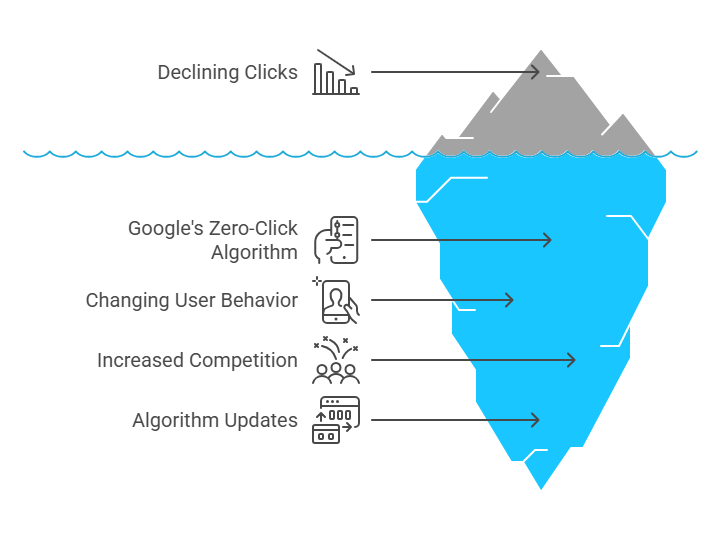
Have you noticed that traffic to your website has fallen in the recent past? If yes, then it is a worrying signal. It happened due to Google. The world’s largest search engine has begun providing information to users on the page itself in various formats, thereby leaving little or no scope to visit other websites.
The zero-click search is a recent phenomenon developed by Google. In this search, a user looks for information on Google that directly answers the query on the search engine results page (SERP) itself and the user does not click on any link. In fact, Google gives answers for questions about basic facts, time, weather updates, time conversions, and mathematical formulas. Sometimes, it provides information and shows links that are very old.
It means that Google is reshaping the search landscape. Thanks to it new AI overviews. Google AIs (AIOs) are the AI-generated summaries that appear above traditional search results, giving users an instant answer without clicking through to a website.
Table of Contents
ToggleWhy is Google changing its strategy?
The question is: why did Google change its ecosystem? According to news reports, Google has been constantly making changes to its search rankings. The company has been making changes every now and then. These “core updates” make rapid and profound changes to search, so website operators need to watch them closely. The most important core update was noticed in March 2024, as Google took over a month to fully roll it out.
According to news reports, it’s common for websites to see traffic changes after a core update, but the impact of the March 2024 update marked a seismic shift. Google said that the update was aimed at addressing spam and AI-generated content in a meaningful way. Still, many publishers said that they saw clicks on legitimate sites evaporate, while others have had to cope with unprecedented volatility in their traffic. Because Google owns almost the entire search market, changes in its algorithm can move the Internet itself.
The March 2024 update looks like the first major Google algorithm update for the AI era. Not only did it (supposedly) veer away from ranking AI-authored content online, but it also laid the groundwork for Google’s ambitious—and often annoying—desire to fuse AI with search.
According to a BBC article, a Google spokesperson reportedly said that the company only launches changes to Search after rigorous testing confirms that the shift will be helpful for users, and that the company gives website owners help, resources, and opportunities for feedback on their Search rankings.
Google stands firm in its position that the changes will be a benefit to the web, and changes to the Search algorithm are just the start. The article said that Google CEO Sundar Pichai recently announced that Google Search would provide its own AI-generated answers to many of your questions, a feature called “AI Overviews” that’s already rolled out to users in the United States.
According to Google sources, the company’s recent updates have come as a big blow to spammy and unoriginal content, and Google keeps a close watch on evolving abusive practices that lead to low-quality information in Search.
Google has reportedly acknowledged that AI tools may provide inaccurate information but maintained that it has been constantly working to improve results. AI Overviews are generally taken from multiple webpages, not just a single source, and the responses are designed to highlight relevant links. However, publishers can use a special tag on their webpages to control whether or not AI Overviews include a link to their sites. However, once an AI model scrapes your content, it may be impossible to remove that data, reported the BBC.
A serious debate has started on the real intention behind changing search strategy. While some say that Google wants people to give information at the platform itself, discouraging people to click on other websites, others say it is due to changing algorythum of Google. According to milkandtweed.com, more than 96 per cent websites get no traffic from Google. Hence, with zero click search the chance of getting any traffic from Google has become very slim. Is your website doomed by the rise of zero click searches, or is there anything you can do to counteract these awful odds?
Others pointed out that Google wants users to stay within its ecosystem. If Google provides faster answers to users then the possibility of users staying on Google search engine would be more. This infact will help increase ad impressions and revenue. Besides, Google prefers to push traffic to its own services like Youtube, Google flights and Google maps.
Impact of Zero Click searches on websites
The impact of zero-click search is visible on website owners, publishers, and small businesses as they see fewer visitors or no visitors on their respective websites. Even if a website is in top searches, it does not necessarily mean that it will get more clicks. As a result, it becomes difficult for website developers and data analysts to understand the real intent of visitors, purpose of engagement, and conversion patterns.
In such cases, users give credit to Google and not your brand. Hence, you may see high search impressions but abysmal click-through rates, skewing performance insights. Also, if there is less traffic, then there will be fewer leads and sales — unless compensated by other channels.
How to identify zero-click search ? Step by Step
Step 1: Start with a Keyword Audit
Use tools like:
Google Search Console
SEMrush
Ahrefs
Ubersuggest
What to look for:
Keywords with high impressions but low click-through rates (CTR)
Keywords that you rank for but see no or minimal traffic
Example:
You rank #1 for “current weather in Delhi.”
Your impressions are high, but CTR is almost 0%. Why?
Because Google shows the answer directly at the top:
“30°C, Sunny. Updated just now.”
No need for users to click.
Step 2: Search the Keyword on Google Manually
Type your keyword into Google in incognito mode or in a browser with no logged-in history.
Observe the search result layout.
Check for the following features:
Featured Snippet (Answer box at the top)
Knowledge Panel (Right sidebar with facts)
People Also Ask (Expandable questions box)
Direct Answers (Like “time in New York” or “1 USD to INR”)
Maps Pack (For local services)
Shopping Carousels (For e-commerce terms)
Example:
Search: “How to tie a tie”
Result: A step-by-step image card directly in Google.
Users don’t need to click any link—classic zero-click.
Step 3: Cross-Check in Google Search Console
In GSC:
Go to Performance → Search Results
Sort by queries and check the CTR column
Red flag:
If you see keywords with thousands of impressions and below 1% CTR, they may be victims of zero-click search.
Example:
You might see:
| Query | Impressions | Clicks | CTR |
|---|---|---|---|
| “What is GST rate in India” | 10,000 | 15 | 0.15% |
This likely means Google is answering it directly in a snippet.
Step 4: Use “SERP Features” Filters in SEO Tools
Tools like SEMrush or Ahrefs show which SERP features exist for each keyword.
Filter your keyword list by:
“Featured snippet”
“Knowledge panel”
“Instant answer”
“PAA (People Also Ask)”
“Local pack”
“Image or Video pack”
These features are common culprits of zero-click results.
Example:
Keyword: “Calories in banana”
SERP feature: Featured Snippet
Impact: Google shows “89 calories” on top—you lose the click
Step 5: Use “AlsoAsked.com” or “Answer the Public”
These tools help identify questions that lead to quick answers, which are prime candidates for zero-click results.
How to use:
Search your main keyword
Identify related “how,” “what,” “when,” and “why” questions
Check which ones Google answers directly
Example:
Search: “Best time to visit Jaipur”
Google gives a direct paragraph with ideal months in a Featured Snippet.
Step 6: Identify Drop Zones in Your Analytics
Use Google Analytics (GA4) to spot:
Pages with declining traffic over time
High-ranking pages with low engagement or bounce rate
Landing pages that previously brought in traffic but now perform poorly
These drops can correlate with Google adding a snippet or direct answer for those search terms.
Example:
Your blog post on “Benefits of aloe vera” used to rank well.
Now, Google displays a panel with medical facts and usage tips, reducing your page visits.
Step 7: Reverse Engineer the Snippet
If your content appears in a snippet—but no one clicks—you are in a zero-click zone.
Try the following:
Reformat your answer to leave curiosity (“Learn more…”)
Use schema markup to add FAQs or How-Tos
Add a downloadable or deeper value to pull users in
Step 8: Test With Voice Search
Zero-click results are also common in voice assistants (Google Assistant, Alexa, Siri).
Try asking your keyword aloud:
“Hey Google, what’s the best shampoo for dry hair?”
If the assistant gives a direct answer from a source—but doesn’t prompt to visit a site—it’s a zero-click use case.
Summary Table: Quick Indicators of Zero-Click Searches
| Indicator | Tool | What It Shows |
|---|---|---|
| High Impressions, Low CTR | Google Search Console | Visibility but no clicks |
| Featured Snippets, Instant Answers | Manual Google Search | Info shown without visiting site |
| SERP Features (Maps, PAA, etc.) | SEMrush / Ahrefs | Non-clickable distractions |
| Declining Organic Traffic | GA4 | Loss of user visits |
| Voice Results | Smart Assistant | Info consumed without web visit |
